By: Katy Rowe-Schurwanz
Family Finder has switched to next-generation sequencing. Learn what’s changed and how to upgrade your existing results.
At the beginning of March 2026, FamilyTreeDNA transitioned lab processing for the Family Finder, our autosomal DNA test, to a targeted next-generation sequencing (NGS) panel.
If your Family Finder processed in our lab prior to March 2026, or if you transferred your autosomal data from another company to FamilyTreeDNA, you can now upgrade your results to be processed with cutting-edge next-generation sequencing technology.
What is Targeted Next-Generation Sequencing?
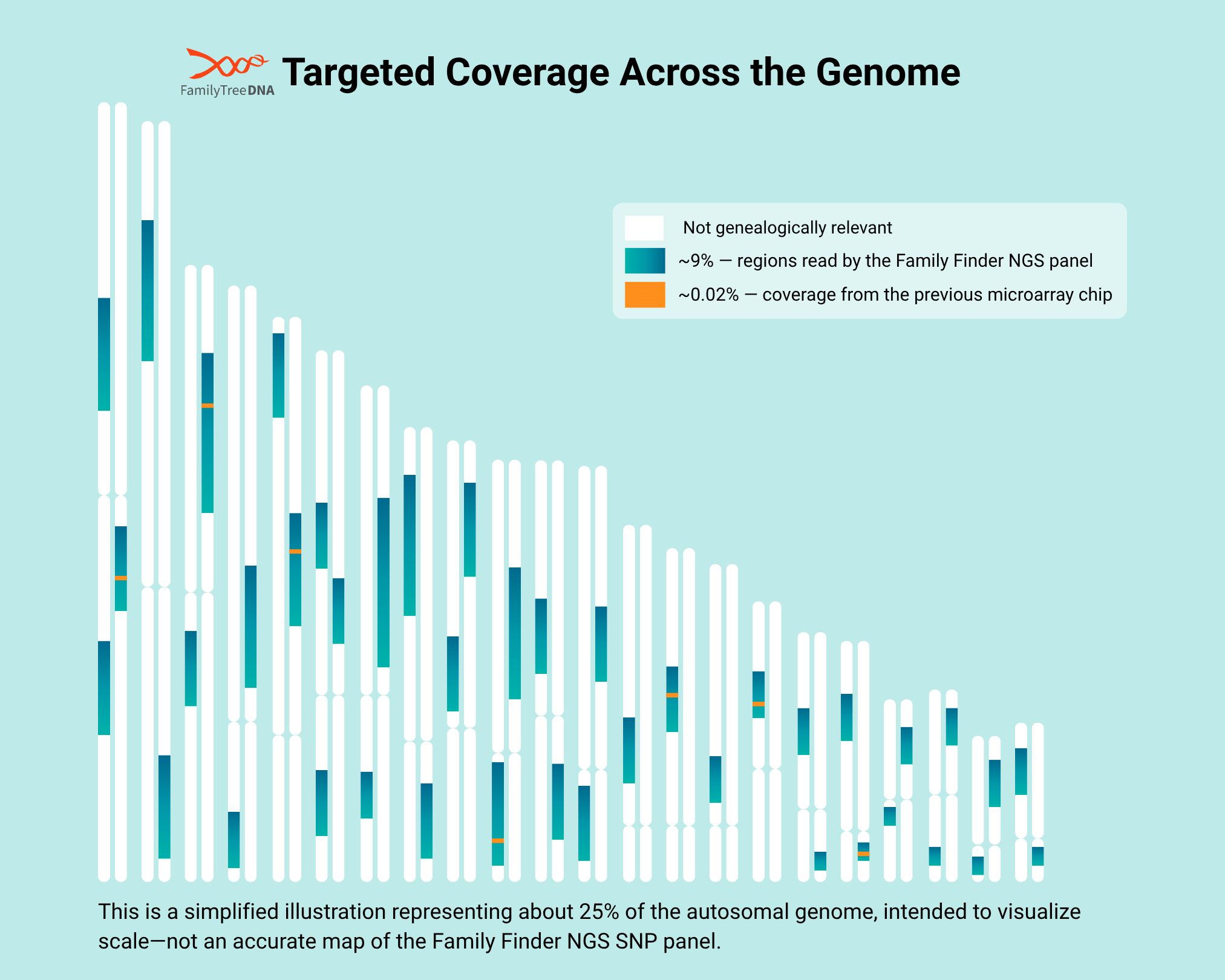
Unlike microarray testing, which checks a fixed list of known DNA positions, targeted next-generation sequencing reads specific regions of the genome in much greater depth. This approach lets Family Finder capture more detail in the areas most useful for ancestry and relative matching, without the cost of sequencing the entire genome.
Why Is Family Finder Moving to Next-Generation Sequencing?
Targeted next-generation sequencing aims to read selected portions of the human genome at high coverage. The Family Finder panel doesn’t aim to read your entire genome but instead focuses on the areas we know have the most value to genetic genealogy and ancestry.
The Big Y-700™ is an example of a targeted NGS panel you may already be familiar with. It scans the genealogically-relevant portions of the Y-chromosome to:
- identify where you belong on the Y-DNA haplotree
- discover new SNPs that are unique to your paternal lineage
- match you to other testers
The new Family Finder panel for now reports the base pairs covered on previous microarray chips, but we are also collecting more data from it that we expect might be useful in future but still needs analysis and tool development.
FamilyTreeDNA General Manager Dave Vance says it best:
“Microarray-based autosomal tests have served genetic genealogy well for nearly two decades. But cutting-edge sequencing solutions now make it possible to affordably harness more of our genetic data for genealogy while ensuring that every kinship prediction and haplogroup assignment is backed by overwhelming evidence, maintaining the trust our customers place in our scientific rigor.”
Will Upgrading Affect My Existing Family Finder Results?
We’ve ensured the new test is compatible with all of our previous microarray chip versions as well as accepted autosomal transfer chip versions, meaning that if you tested between 2010 and February 2026, or if you’ve transferred from another company, you’ll still be able to match with someone who tested last week and vice versa.
When you upgrade to the new Family Finder NGS version, your raw data file may include more SNPs than the previous microarray test. With this additional data, for now you may also see a few extra distant matches or some minor differences in the segment data shared between you and some of your matches. Your myOrigins® results may change by a few percentage points from your previous results too, but overall you should not see any huge differences there.
For genetic males, the number of included Y-DNA SNPs has gone up slightly, so you may see the same Y-DNA haplogroup* with the new test or you might see a slightly more refined one (i.e. a little closer to present day).
One more thing to keep in mind: your previous results will be removed once your new NGS results are posted, so save anything you want to hold onto beforehand.
Why Upgrade to the Family Finder NGS Test?
By upgrading to the new Family Finder NGS test you’re future-proofing your autosomal DNA. You’re ensuring your genetic legacy is stored at the highest resolution possible, making your data ready for whatever new features and tools come next
Additionally, for those who have transferred their autosomal DNA from another company, you’ll receive all of the current Family Finder reports and tools:
- Chromosome Browser
- myOrigins®
- Chromosome Painter
- ancientOrigins
- a medium-resolution Y-DNA haplogroup* plus access to the Y-DNA Discover™ haplogroup reports (for genetic males)
What new features and tools will I get?
We’re hard at work on those right now! We still need to determine what is most valuable for genealogists out of what is possible and turn that into products, so it’s too early to commit to a release date. By upgrading your autosomal test early, you’ll be helping us with data to prove out that value, and you’ll be all set when those new features are released!
In the meantime, make sure you’re subscribed to our emails so that you receive announcements when they’re made.
How to Order and Upgrade Your Family Finder Test
Upgrading to the new Family Finder NGS test involves ordering the upgrade, providing a sample if one is needed, and waiting for lab processing before your new results post. The steps vary slightly depending on whether you’re upgrading an existing Family Finder test or an Autosomal Transfer.
Upgrading from a Family Finder Test
If your Family Finder results were processed using the older microarray method, here’s what to expect at each step.
Step 1: Ordering Your Upgrade
There are several easy to find ways you can purchase the upgrade after signing in to your kit.
The product name will differ based on your current autosomal testing.
For Family Finder testers with microarray results, you should see “Family Finder Upgrade” as a product option.
From the Dashboard
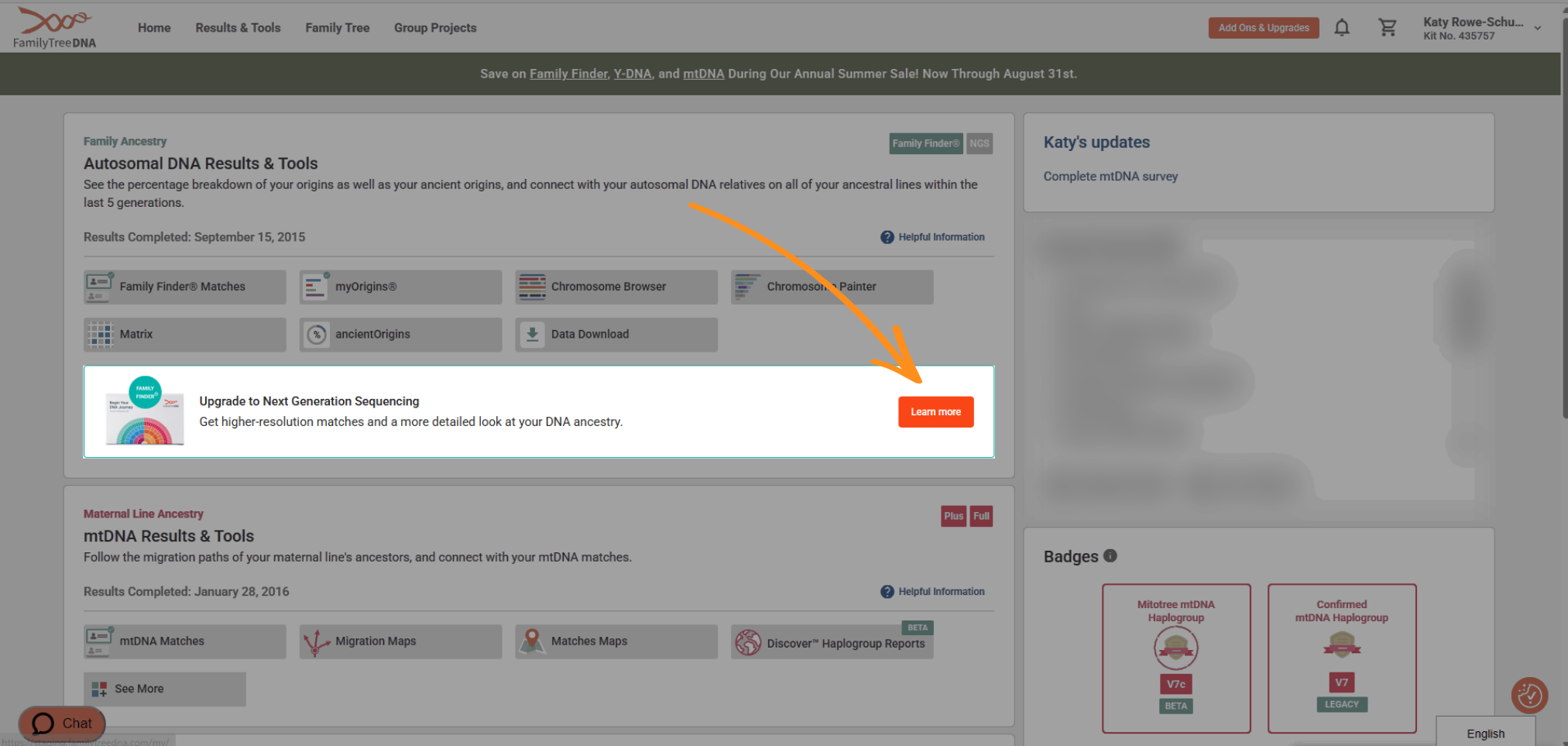
Under the Family Finder section of your dashboard, you’ll see a blue box below the buttons for your reports. Inside that box is an orange Learn more button.
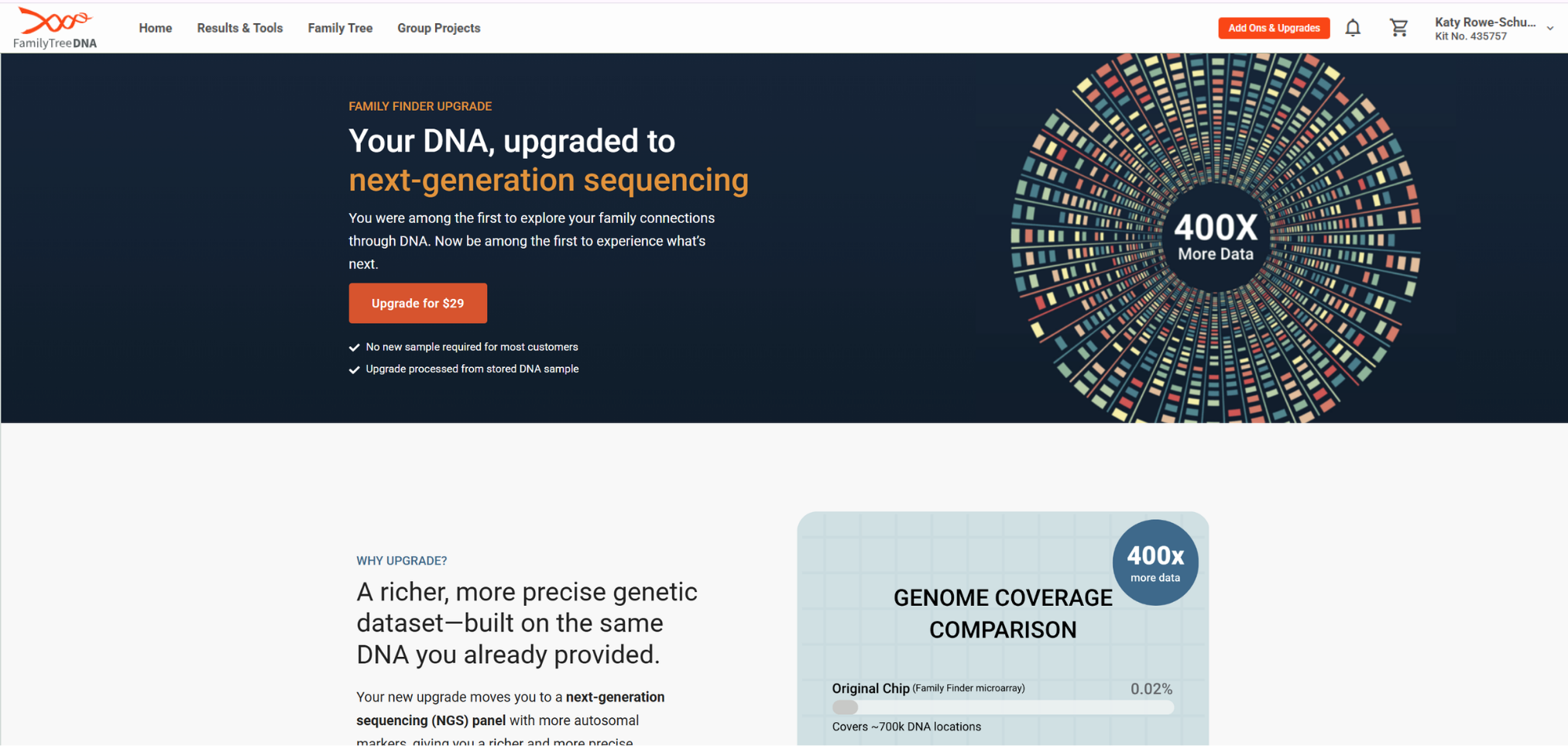
Click Learn more which will take you to the Family Finder Upgrade product page for the upgrade so you can read more about all the benefits. From that page, click “Add to cart.”
Navigate to your cart and complete checkout.
From Add Ons and Upgrades
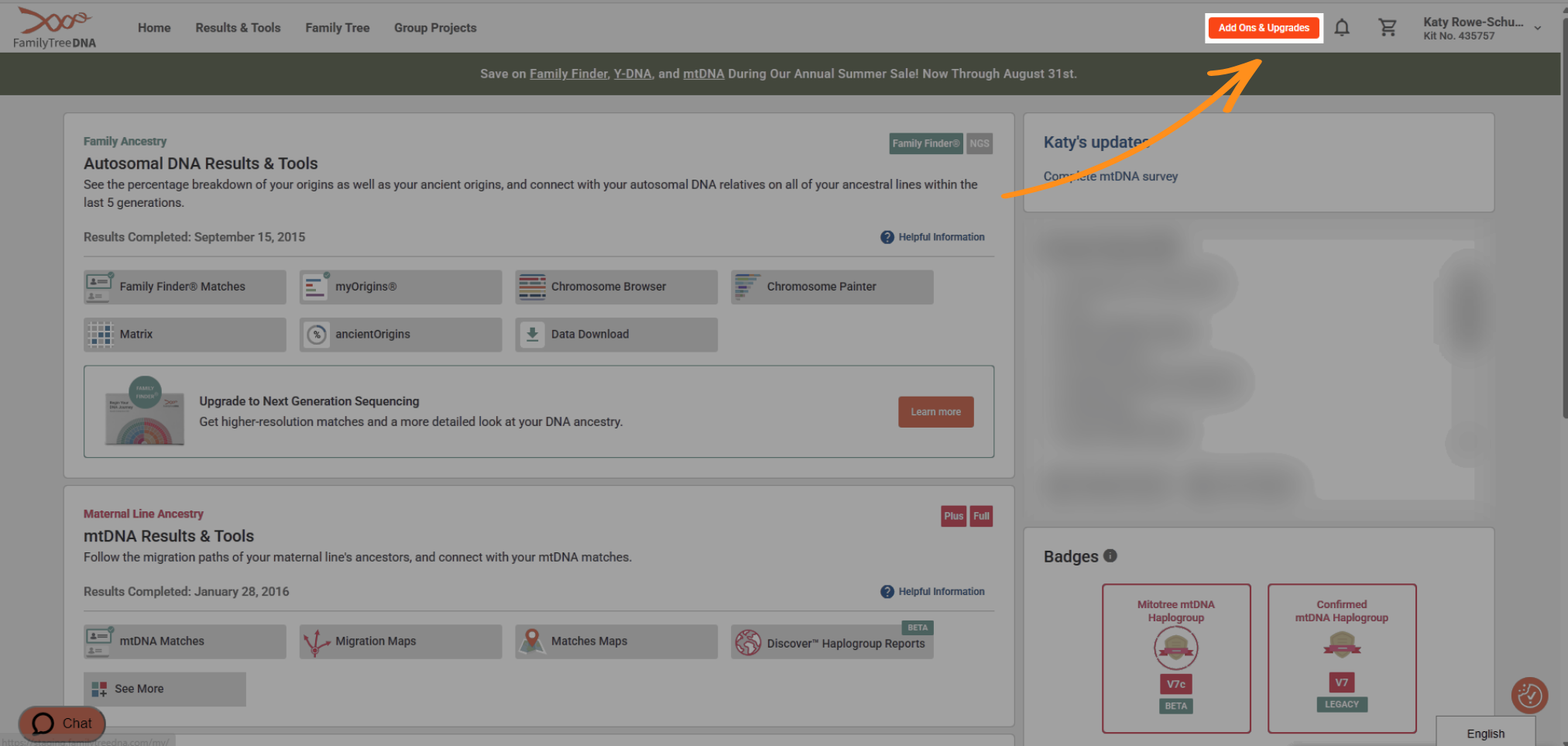
In the top right of your dashboard, to the left of your name and kit number, click the orange Add Ons and Upgrades button.
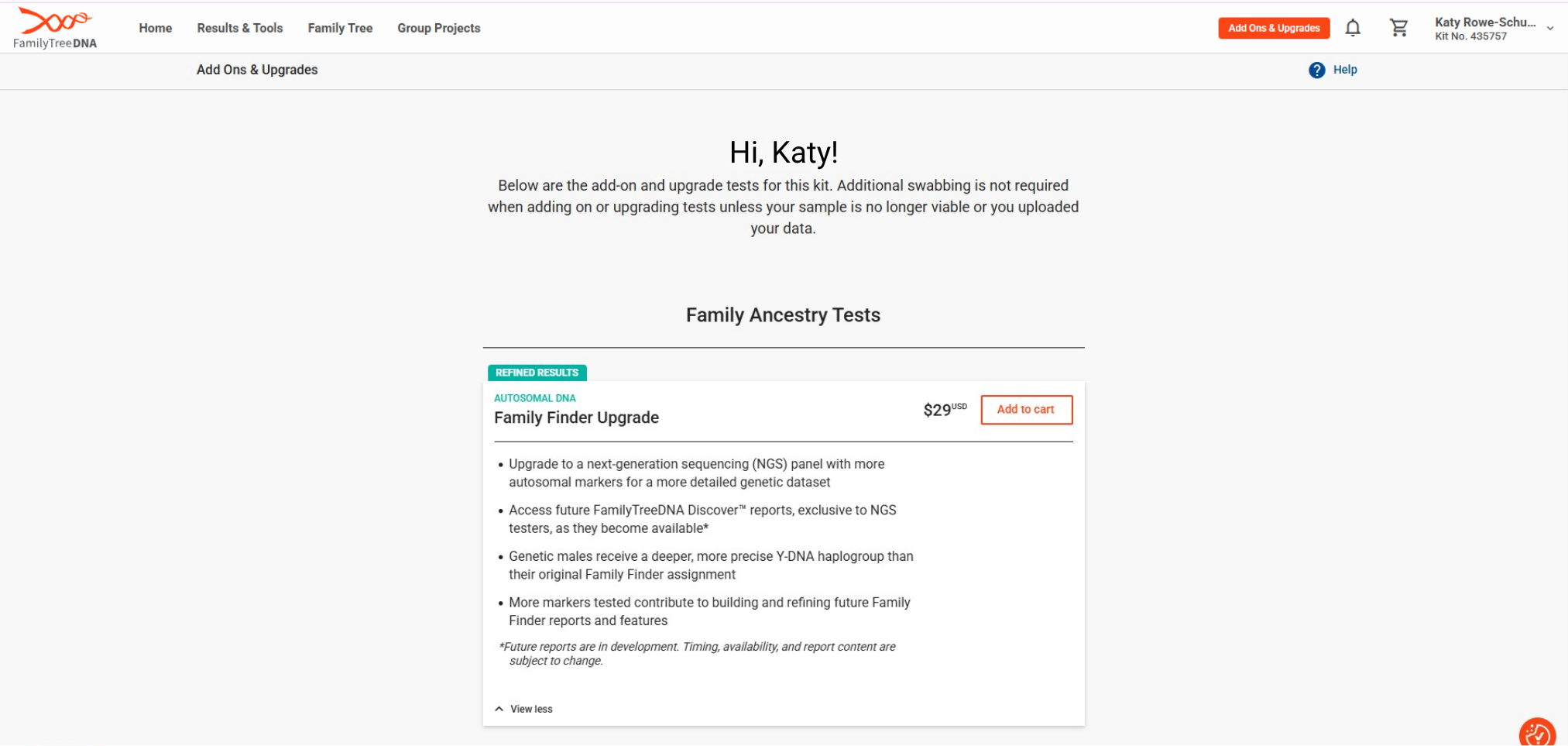
At the top of the Add Ons and Upgrades page you’ll see “Family Finder Upgrade” listed under Autosomal DNA Tests. Click the orange-outlined Add to cart button.
Navigate to your cart and complete checkout.
Step 2: Pulling your sample from storage
For next-generation sequencing, it’s important to have a high quality sample to work with. So even if you have previously submitted a sample to FamilyTreeDNA, our lab may ask for a new one.
If the lab decides they need a fresh sample from you, a new collection kit will be sent automatically. No action is needed from you except to ensure your shipping address is correct when placing your order and to return your new samples.
If you tested a family member who has since passed away and are unsure if they have a sample available to process, please:
- Ensure you update their settings to inform the lab they’ve passed
- Reach out to Customer Support to check on their sample availability prior to placing your order.
Step 3: Processing in the lab
Once the lab has your sample, they’ll extract it and start processing. Because this is new technology, it will take a few weeks longer than the old microarray testing did. You can check the current processing times in our Help Center.
After lab processing is complete and your data passes quality control, the lab will send your data to be analyzed for matching and origins.
Step 4: Analyzing and posting your new results
Your previous Family Finder results will be removed from the database when we post your new results.
If there is any information about your previous Family Finder results you’d like to save (raw data, myOrigins, match list, segment data, etc) please make sure you download or take screenshots before you place your order. Your previous data and results will no longer be available once they are removed at the end of processing.
Removing your old results is the very last step before we post your new ones, so you should see minimal interruption in accessing your results.
Upgrading from an Autosomal Transfer
If you transferred your autosomal results from another company, your upgrade path looks a little different — here’s what to expect.
Step 1: Ordering Your Upgrade
The process to upgrade to the Family Finder NGS test is similar if you have tested your autosomal DNA with another company and transferred to FamilyTreeDNA.
The product name will differ based on the current status of your transfer:
For Autosomal Transfer testers who have unlocked all of the Family Finder features, you should see “Autosomal Unlock to Family Finder Upgrade” as a product option.
For Autosomal Transfer testers who have not unlocked all of the Family Finder features, you should see “Autosomal Transfer to Family Finder Upgrade” as a product option.
To add the upgrade to your cart will be the same process through either your dashboard or through the Add Ons and Upgrades page.
Step 2: Sending you a collection kit
If you’ve never submitted a sample to FamilyTreeDNA, we’ll mail our DNA collection kit to you within 1-2 business days after your order is paid. Please ensure your shipping address is correct in your account settings.
Step 3: Processing in the lab
Since your original sample was processed by another lab, this will be the first time FamilyTreeDNA extracts and sequences your DNA. Because next-generation sequencing is more involved than the older microarray method, expect a few extra weeks compared to standard processing timelines — you can always check current estimates in our Help Center. Once your data clears quality control, it moves on to matching and origins analysis.
Step 4: Analyzing and posting your new results
What you’re currently getting from FamilyTreeDNA depends on your transfer status. If your transfer is locked, you have access to your matches and the Family Finder Matrix. If it’s unlocked, you already have the rest of the Family Finder matching and origins reports and tools.
Either way, once your new NGS results post, your original Autosomal Transfer data will be removed from our database. If your transfer is unlocked, you can download your matches and segment data or take screenshots before placing your order, since your original results will not be recoverable once processing is complete. Raw data is not available for download. If your transfer is locked, this data will not be available to save beforehand.
This removal happens right before your new results post, so you’ll only see a brief gap in access.
Start Your Family Finder Upgrade
Whether you’re upgrading from a previous Family Finder test or an Autosomal Transfer, sign in to your account to see your upgrade options.
Frequently Asked Questions About Upgrading Family Finder to Next-Generation Sequencing
Will upgrading change my DNA matches?
You may see a few additional distant matches or small differences in shared segment data with existing matches, since the new NGS test can detect more SNPs than the previous microarray test. Your closer matches and overall match list should remain largely the same.
Why did FamilyTreeDNA switch to next-generation sequencing?
Next-generation sequencing lets FamilyTreeDNA capture more genetic data at a higher resolution than the older microarray method, strengthening the scientific basis behind kinship predictions and haplogroup assignments as the technology has become more affordable.
Do I have to upgrade my Family Finder results?
No. Upgrading is optional. Your existing results will continue to work and match normally with both older and newer tests, since the new panel is fully compatible with all previous microarray and transfer chip versions.
Do I need to send a new DNA sample to upgrade?
It depends. Because NGS requires a high-quality sample, FamilyTreeDNA’s lab may request a new one even if you’ve previously submitted a sample. If a new sample is needed, a collection kit will be sent to you automatically.
How much does the Family Finder upgrade cost?
The Family Finder upgrade costs $29. Pricing may vary by promotion, so check the product page for current pricing.
What new features will I get access to after upgrading?
FamilyTreeDNA is developing new tools to take advantage of the additional data collected by the NGS panel. While a release date hasn’t been announced, upgrading now means you’ll be ready to use these features as soon as they launch.
For more information and answers to frequently asked questions, visit our Help Center.
*In some cases, testers may not have enough Y-DNA SNP coverage for a confident haplogroup assignment.
