By: Roberta Estes
Updating your Earliest Known Ancestor (EKA) information at FamilyTreeDNA helps improve mtDNA Discover™, enhances genealogy research, and makes match connections more meaningful—here’s how you can contribute.
I’ve been testing the newly released Updated mtDNA Haplotree and mtDNA Discover haplogroup reports and have some things to share with you.
For anyone who has ever been involved with a major release that includes brand-new tools, you know that means that our research team has been neck deep in testing, refining and preparing.
The new mtDNA Discover tool functions similarly to Y-DNA Discover, but it’s designed specifically for mitochondrial DNA (mtDNA) results, helping testers explore their maternal line and understand their place on the haplotree.
However, I’ve noticed something you can help us with.
What Are mtDNA Discover Time Tree Clusters?
I’m using my husband Jim’s kit for testing. On the existing tree, his mtDNA haplogroup was V, but with the Updated mtDNA Haplotree, it has been refined to V71b—one of the thousands of new haplogroups added to the tree. His new mtDNA Discover V71b Time Tree now looks like this:
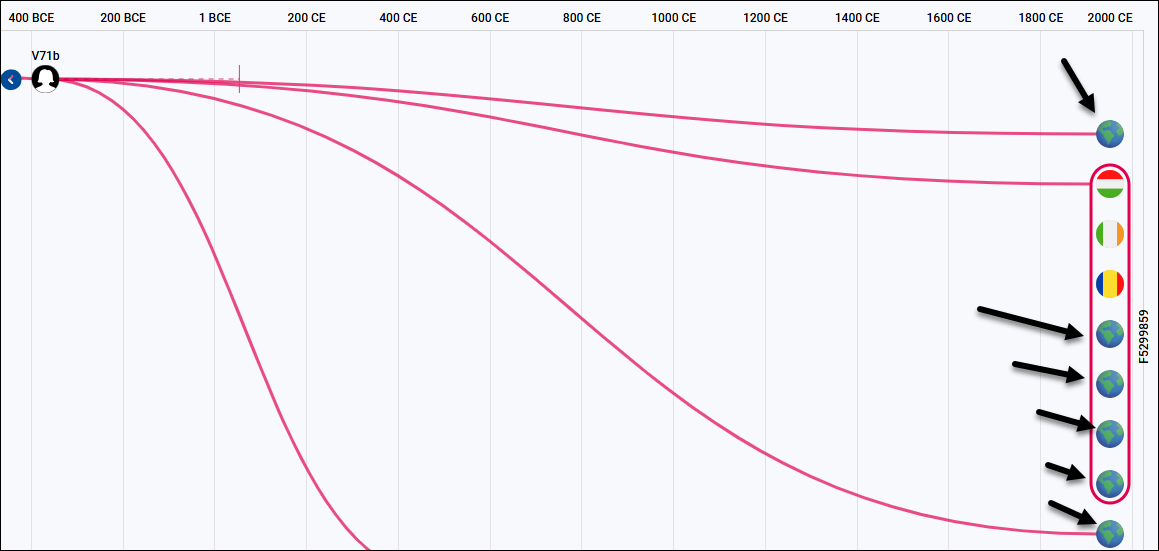
The problem? All those Earth globes with black arrows.
These globes indicate testers who did not provide location details for their EKA on their matrilineal line.
You don’t need an exact birthplace—just selecting a country is better than leaving it blank. If all you know is the United States, Canada, or another broad region, that’s still useful.
The circles with flags indicate testers who have completed their EKA information, helping others identify potential geographic connections within their haplogroup or haplogroup subgroup.
If you’re a tester, it can be frustrating to have mtDNA matches but lack genealogy details to explore shared ancestry.
How Updating Your EKA Helps Everyone
We need your help—not just by updating your own EKA information, but by encouraging your matches to do the same.
When testers leave this section blank, it creates challenges in understanding maternal ancestry and can lead to the misconception that mtDNA isn’t useful. That then becomes a self-fulfilling prophecy—if testers don’t see value, they don’t test, and valuable connections are lost.
But here’s the truth: Matching, mtDNA tools, and mtDNA Discover can be far more powerful when testers complete their EKA information—and encourage their matches to do the same.
It’s a win-win. Feel free to share this blog with your matches in a polite email, asking them to update their EKA information.
How the mtDNA Discover Match Time Tree Uses Your Self-Reported Information
One of the most exciting new features introduced alongside the Updated mtDNA Haplotree is the Match Time Tree. This tool helps mtFull Sequence testers visualize their matches in clusters based on their maternal ancestry and how closely they relate to one another.
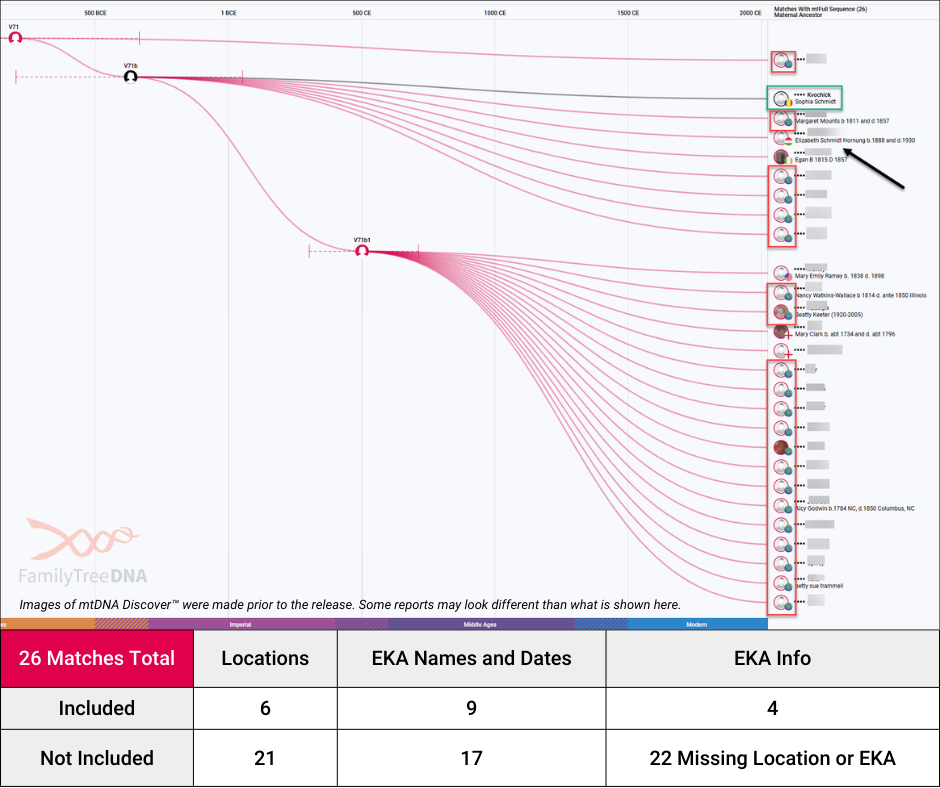
Above, you can see Jim’s Match Time Tree—and how much more insightful it would be if every tester had completed their EKA information.
In this example, Jim’s matches are grouped by haplogroup:
- V71: This branch includes only one tester.
- V71b: This branch includes Jim (black line) and seven other testers who are exact matches.
- V71b1: This branch contains 19 testers.
Of Jim’s 26 mtDNA matches, only:
- Nine testers have completed their EKA names and dates.
- Six testers have provided location details.
- Only four testers have included both.
Viewed another way, that means about 75% of testers in this group could provide valuable genealogical insights if they simply updated their EKA and location information.
Why Completing Your EKA Unlocks More Genealogy Insights
When more testers complete their EKA details, family history research becomes more effective, allowing connections to be made across haplogroups and deep matrilineal ancestry to be explored.
Simply put: More informed testers lead to better results, more discoveries, and a stronger genealogy community.
Thankfully, fortune smiled on me while testing the new mtDNA Discover reports.
My Discovery Using a Match’s EKA Information
I noticed something new since the last time I checked Jim’s mtDNA Discover results—look at those black arrows!
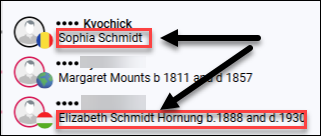
Jim’s maternal EKA is Sophia Schmidt, a surname that was later anglicized to Smith. One of his matches listed their EKA as Elizabeth Schmidt Hornung, born in 1888 and deceased in 1930. Hornung is likely a married name.
My family history research for Jim indicates that Sophia Schmidt was born in Timisoara, Romania. However, his match’s EKA information shows a Hungarian flag for Elizabeth Schmidt Hornung.
Since Schmidt/Smith is a common surname and the reported birth countries differ, could these two ancestors be part of the same family?
Solving a Family History Puzzle
Jim’s match did not have a family tree, but because they included EKA information, I had a solid starting point.
After about an hour of research, I confirmed that Elizabeth Schmidt Hornung and Sophia Schmidt were sisters. This discovery led to:
- Identifying their parents
- Finding several siblings
- Learning they immigrated around 1910 and settled in Mansfield, Ohio
The different country flags reflect the shifting political landscape of the Austro-Hungarian Empire, which was in a constant state of flux in the late 1800s and early 1900s. Boundaries changed, and families moved in search of stability and safety, making genealogy research in this region especially challenging.
Why Ancestor Details Are Key to Genealogy Success
Without that EKA data, I never would have made this discovery—or known that Jim’s match is actually connected through his great-grandmother’s sister. Even better? There’s a wedding photo!
Just one piece of maternal line information can make all the difference in uncovering your family history.
How EKA Information Helps You and the Genealogy Community
Let’s explore how EKA details enhance your genealogy research, where this information appears across FamilyTreeDNA, and how you can update your EKA information for better results.
Where Your Earliest Known Ancestor Appears at FamilyTreeDNA
Both matrilineal and patrilineal EKA details are integrated into FamilyTreeDNA reports in the same way.
Even if you’re female and don’t have a Y chromosome to test, it’s still valuable to complete your patrilineal EKA information. You never know what genealogy tools and DNA advancements might emerge in the future!
You’ll find the EKA details of other testers throughout various reports, helping guide your family history research and making mtDNA results even more insightful.
How mtDNA Discover™ Uses Your Ancestor Details
mtDNA Discover functions much like Y-DNA Discover, using EKA data to enhance several key features:
- Haplogroup Story: Displays the countries where testers from your mtDNA haplogroup have reported their maternal EKA location.
- Country Frequency: Highlights where your maternal haplogroup is most commonly found today, based on self-reported data from thousands of mtDNA testers.
- Notable Connections: Uses EKA dates to estimate historical timelines for your haplogroup, shown in the Timeline near the bottom of the page.
- Globetrekker: Combines EKA location details with population genetic studies and ancient DNA from archaeological remains.
- Ancient Connections: Incorporates EKA dates into Time Tree calculations to provide historical context, shown in the Timeline near the bottom of the page.
- Time Tree: Displays EKA location flags and incorporates self-reported dates into the haplogroup evolution algorithm.
- Match Time Tree: Provides EKA location flags, ancestor names, and birth/death years for your mtDNA matches.
- Ancestral Path: Uses an algorithm that integrates EKA data to estimate the timeline of maternal ancestry.
- Scientific Details: Includes Time to Most Recent Common Ancestor (TMRCA) estimates, calculated with EKA information.
- Compare: Uses EKA dates within the Time Tree timeline.
- Classic Tree: Displays EKA location flags and uses the data to refine the tree’s structure.
Where to Find Earliest Ancestor Information For Matches
Your EKA details and mtDNA match data appear throughout various reports:
- Matches: Displays your matches along with:
- Maternal Country of Origin (based on EKA location).
- Maternal Earliest Known Ancestor (including name, birth year, and death year).
- Ancestral Origins: Highlights the countries of origin reported by your mtDNA matches.
- Haplogroup Origins: Maps the direct maternal line locations for your matches’ earliest known ancestors.
- Matches Map: Visualizes EKA locations on an interactive geographic map.
The Public mtDNA Haplotree: How Ancestor Data Shapes the Tree
The public mtDNA Haplotree defaults to displaying EKA location countries for each haplogroup, along with a numerical count indicating how many testers have reported that country for their maternal ancestor.
How Group Projects Use Ancestor Information to Connect Testers
If you haven’t already, I highly recommend joining relevant Group Projects at FamilyTreeDNA!
On public Group Project pages, EKA information is used in two key reports:
- mtDNA Test Results for Members: Displays the maternal ancestor name reported by each tester.
- Member Distribution Map: Provides a visual representation of the geographic locations of earliest known maternal ancestors for project members.
Your EKA and location details are essential for:
- Group Project Administrators managing DNA research.
- Fellow Group Project members trying to establish shared ancestry.
Of the 43 tools available to volunteer Group Project Administrators, 15 rely on EKA information to enhance match analysis and connections.
How Group Project Administrators Can Improve EKA Data
Group Project Administrators who have been granted advanced access from members can manually add or update EKA details for testers if:
- The tester’s family tree or profile card isn’t set to private.
- The Earliest Known Ancestor isn’t listed as living.
If you’re a Group Project Administrator, consider assisting your project members by updating EKA details when possible—it makes a huge difference in the value of mtDNA results!
How to Add or Update Your EKA Information
Adding or modifying EKA information to your account is simple, but first let’s clarify which ancestor you should be adding.
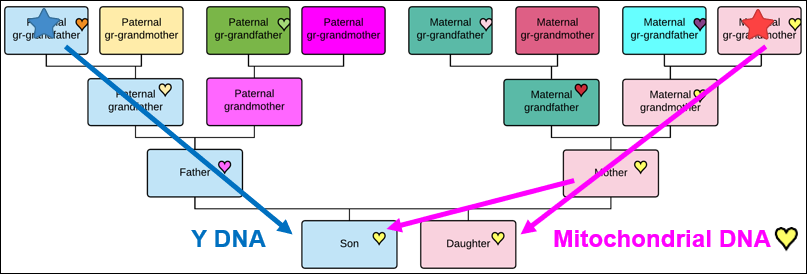
Your EKA is the earliest documented ancestor in your direct paternal or maternal line.
- Paternal EKA (blue star): This is your direct patrilineal ancestor.
- They are not just the oldest known ancestor somewhere on your father’s side of the family tree.
- For example, in my case, my paternal EKA is the furthest documented Estes male in my patrilineal lineage.
- Maternal EKA (red star): This is your direct matrilineal ancestor.
- They are not just the earliest known ancestor somewhere on your mother’s side of the family tree.
- If you see a presumably male name listed here, the tester might’ve misunderstood the instructions.
Reminder: mtDNA is only passed from mother to child, meaning males do not pass it to their descendants. If you come across a misreported male ancestor, consider sending your match a friendly message with a link to this article so they can correct the information.
Step-by-Step Guide to Adding Your EKA Information
Below is a step-by-step guide to help you add or update your EKA details.
Step 1 – Sign In
Sign in to your FamilyTreeDNA account.
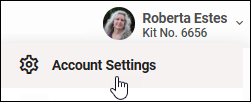
Click on the down arrow beside your name, then select Account Settings.
Step 2 – Account Settings
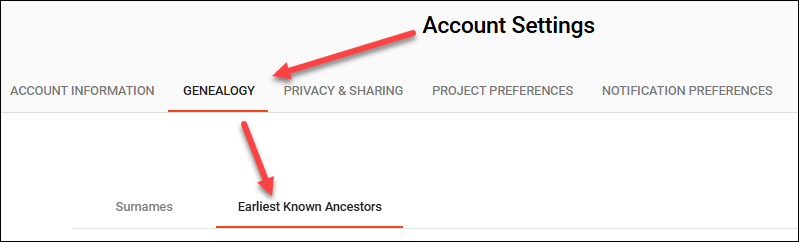
Under Account Settings, go-to the Genealogy tab and then the Earliest Known Ancestors tab.
Step 3 – Ancestor Names and Country
For both your direct paternal (patrilineal) line, and your direct maternal (matrilineal) line, enter:
- Ancestor’s Name
- Birth Date (format: b. YYYY)
- Death Date (format: d. YYYY)
- Country of Birth (select from the dropdown menu)
Template for formatting:
First Name Last Name b. YYYY d. YYYY
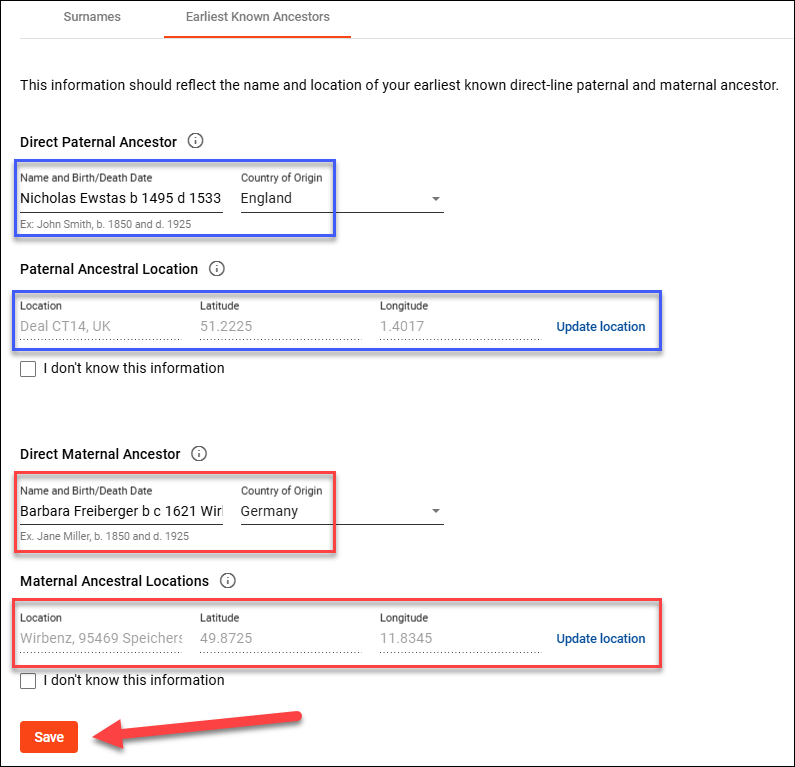
After you’ve completed your updates, don’t forget to “Save.”
What if I Don’t Know My EKA Yet?
If you’re still working on your family history research, that’s okay! Simply check the box “I don’t know this information”—this prevents login reminders while you continue your research.
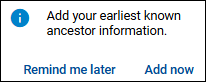
If you’re still receiving a reminder notification in the bottom right-hand corner of your screen, double-check that:
- You have completed all required fields.
- You clicked “Save” after entering your information.
As you break down genealogical brick walls and uncover new maternal or paternal ancestors, remember to update your EKA—this helps others connect, collaborate, and make new discoveries.
Genealogy is a team sport! The more we share, the more we all benefit.
Step 4 – Map Location
Next, complete the location by clicking on the blue “Update Location” button.
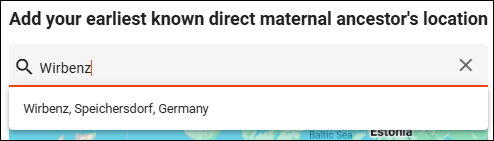
You have two ways to enter a location:
- Start typing the location in the search box.
- Manually select a location on the interactive map.
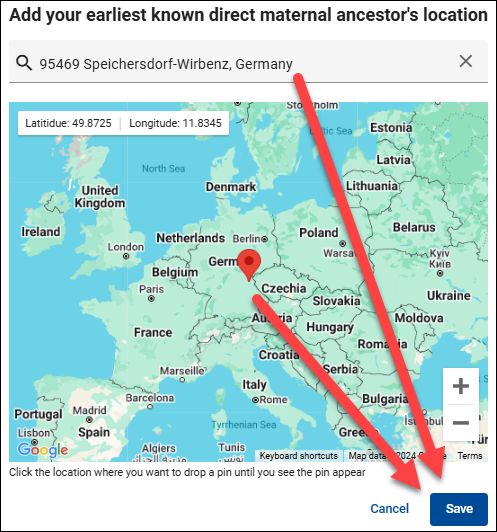
Tip: If you manually place a location pin, it will automatically update the text box.
Don’t forget to save!
Saving this step will return you to the Account Settings page, where you’ll need to click “Save” one final time.
Encourage Your Matches to Share Their Ancestor Details
Once you’ve updated your own EKA information, consider reaching out to matches who haven’t. I’ll be sending friendly reminders to my matches based on:
- The “Earliest Known Ancestor” field on my mtDNA Matches page.
- The presence (or absence) of location pins on my Matches Map.
Encouraging others to complete their EKA details makes mtDNA matching, haplogroup research, and family history exploration even more valuable for everyone.
Thank You for Helping Improve the Updated mtDNA Haplotree
The new Updated mtDNA Haplotree and mtDNA Discover are truly revolutionary advancements in mtDNA research.
I hope we see a significant increase in the number of Earliest Known Ancestors location entries now that the Updated mtDNA Haplotree is available. The more testers who complete this information, the more genealogical insights we can uncover from mtDNA matches.
As genealogists, we want to encourage others to explore their family history by testing their Y-DNA and mtDNA. But to make these tests as valuable as possible, we need to maximize the usefulness of match data—helping push our ancestry research even further back in time.
So, take a moment to add or update your EKA information, and while you’re at it, check for any new mtDNA matches.
Is there a success story waiting for you?
